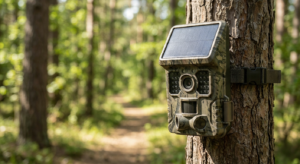
You installed a solar security camera to keep your home safe 24/7. But there’s one frustrating problem: it works perfectly during the day, then mysteriously goes offline every night.
You’re not alone. Thousands of solar camera owners face this exact issue who have chosen the best solar security camera according to them and the good news is that it’s almost always fixable. Here’s what’s happening: your solar security camera is like a car that refills its gas tank during the day. If it doesn’t get enough “fuel” (sunlight), or if it burns through power too quickly at night, it simply shuts down when you need it most.
In this guide, we’ll walk through the most common reasons why solar cameras fail at night and show you exactly how to fix each one.
First Step: What’s Actually Wrong?
Before we dive into solutions, let’s figure out what type of problem you’re dealing with.
Check your camera right now:
Scenario A: The camera is completely offline
- Your phone app says “Device Offline” or “No Connection”
- The status light on the camera is off
This means: Power problem or dead battery
Scenario B: The camera is online but the video looks wrong
- You see a milky white fog on the screen
- The video is pitch black even though there’s outdoor lighting
- Everything looks blurry or washed out
This means: Night vision problem or placement issue
Once you know which scenario matches your situation, jump to the relevant section below.
Problem #1: Not Enough Sunlight (The Most Common Issue)
Here’s a fact that surprises most people: your solar panel doesn’t just need light it needs direct sunlight. There’s a huge difference.
The 5-Hour Rule
Your solar security camera needs at least 5 hours of direct sunlight each day to stay charged. Cloudy weather or shade gives you only 10-25% of the power you’d get from direct sun.
Think of it this way: one hour of direct sunlight equals about 4-10 hours of cloudy/shaded light. That’s why your camera might work fine in summer but fail every night in winter.
How to Position Your Solar Panel Correctly
Direction matters:
- If you live in North America, Europe, or Asia: point your panel toward the south
- If you live in Australia, South America, or Southern Africa: point it toward the north
Angle matters too:
- Tilt your panel between 30° and 45°
- A flat panel (0° angle) collects dust, misses the low winter sun, and can lose up to 35% efficiency
- Mounting it at the right angle helps rain wash away dirt naturally
Clean your panel:
A dirty solar panel is like trying to charge your phone through a muddy screen protector. Studies show that dust and grime can reduce charging efficiency by 20-30%. Wipe it down with a damp cloth once a month.
Quick Win: The Manual Reset
If you’ve had several cloudy days in a row, your battery might be stuck in a low-power cycle. Here’s the fastest fix:
1. Take your camera down
2. Plug it into a wall outlet using the USB cable
3. Charge it to 100% (usually takes 4-6 hours)
4. Reinstall it
This “resets” the battery and gives your camera a fresh start. Many users report that this alone solves their nighttime dropout problem.
Problem #2: Cold Weather is Killing Your Battery
Here’s something most people don’t know: batteries hate the cold.
Your solar security camera uses a lithium-ion battery (the same type in your phone). When temperatures drop, these batteries lose their ability to hold a charge:
- At 32°F (0°C): Battery works at only 80% capacity
- At 14°F (-10°C): Battery drops to 60% capacity
- At -4°F (-20°C): Battery might only give you 50% power
This explains why your camera works fine in summer but fails every winter night.
What you can do:
- Mount your camera in a spot that gets some protection from extreme cold (under an eave but not too close—more on that below)
- During harsh winter months, manually charge the camera every 2-3 weeks via USB
- If your battery is more than 2 years old and consistently fails in cold weather, it might need replacement
Problem #3: Night Vision is Draining Power Too Fast
When the sun goes down, your solar camera switches to night vision mode. This turns on infrared (IR) LEDs—invisible lights that let the camera “see” in the dark.
Here’s the catch: night vision uses 30-50% more power than daytime recording.
If your battery enters the night with only 60% charge, and night vision doubles the power drain, your camera might die by midnight.
The fix:
- Make sure your camera is getting a full charge during the day (see Problem #1)
- Lower your motion sensitivity (explained below)
- Reduce recording time per trigger
Problem #4: The “White Screen” or “Black Screen” Problem
If your camera is online but the video looks terrible at night, you’re dealing with an infrared reflection issue.
The White Fog Problem
Your camera is probably too close to a wall, fence, or roof overhang. The infrared light bounces off that surface and floods back into the lens—like shining a flashlight into a mirror.
How to fix it:
- Move the camera at least 2-3 feet away from walls or solid surfaces
- Angle it slightly downward and away from nearby objects
- Make sure there’s at least 6-8 feet of clear space in front of the lens
The Pitch Black Problem
Two common causes:
1. You mounted it behind glass
Never put a solar security camera behind a window. The IR light reflects off the glass and creates a completely black image. The camera literally blinds itself.
2. Night vision is turned off in settings**
Open your camera app and check that “Night Vision” is set to Auto (not “Off”). Some cameras default to “Off” and you have to enable it manually.
The Spider Web Problem
This sounds silly, but it’s incredibly common. Spiders are attracted to the warmth of your camera’s IR LEDs. They build webs right in front of the lens overnight.
Even a single strand of web can catch the infrared light and create a bright white blur that ruins your video.
Solution: Check your camera lens every few weeks and wipe away any webs with a soft cloth.
Problem #5: Your Settings Are Draining the Battery
Many solar cameras come with default settings that work great for wired cameras but destroy solar camera batteries.
Motion Sensitivity
If your camera is set to “High” sensitivity, it might be recording 50-100 videos per day every time a car passes, a branch sways, or a shadow moves. Each recording drains power. By the time night arrives, your battery is already at 40%.
What to do:
- Open your camera app settings
- Set motion sensitivity to “Medium” or “Low”
- If available, enable “Person Detection” or “Human Detection” this filters out cars, animals, and shadows
- Test it for a day and adjust
Recording Duration
Does your camera record 60-second clips every time it detects motion? That’s overkill.
Better setting: 15-20 seconds per clip
This captures everything you need while saving significant battery power. Over 10 triggers per night, you’ll save 6-7 minutes of recording which can be the difference between staying online or going dead at 2 AM.
Night Vision Mode
Double-check that your IR mode is set correctly:
– “Auto” = Best option (turns on only when needed)
– “Always On” = Drains battery even during twilight hours
– “Off” = You get black video at night
Problem #6: Weak Wi-Fi Signal (The Hidden Battery Killer)
Here’s something most people miss: when your solar security camera can’t connect to Wi-Fi reliably, it keeps trying over and over. This constant reconnection attempt drains the battery fast.
Night vision footage is also larger in file size (grainy footage is harder to compress). If your Wi-Fi signal is weak, uploading takes longer, which drains more power.
Signs your Wi-Fi is the problem:
- Camera disconnects specifically between midnight and 6 AM
- Other smart devices in the same area also have connection issues
- Your camera is more than 30-40 feet from your router
Solutions:
- Install a Wi-Fi extender between your router and camera
- Upgrade to a mesh Wi-Fi system
- If possible, move your router closer to a window facing the camera
Quick Troubleshooting Checklist
Use this to diagnose your specific problem:
| What You See | What’s Wrong | How to Fix It |
| Camera offline every night | Not enough daytime charge | Clean panel, reposition to face south, tilt 30-45°, USB charge to 100% |
| White fog on screen | IR reflecting off nearby wall | Move camera 2-3 feet from walls, angle away from surfaces |
| Pitch black video | IR not working or behind glass | Check app (Night Vision = Auto), remove from behind windows |
| Camera dies by midnight | Battery drained by recordings | Lower motion sensitivity, reduce clip length to 20 seconds |
| Blurry night video | Dirty lens or condensation | Wipe with microfiber cloth, check for moisture inside |
| Drops offline randomly | Weak Wi-Fi signal | Add Wi-Fi extender, move router closer |
One More Pro Tip
Before you install your solar security camera for the first time, charge it to 100% using a wall outlet. Don’t rely on solar charging for the initial setup.
Why? Because the battery ships partially charged (usually 30-50%). If you install it immediately, it might not have enough power to make it through the first night, which can confuse the battery management system.
Final Thoughts
Most solar security camera nighttime failures come down to three things:
1. Not enough sun during the day (poor panel positioning)
2. Too much power drain at night (motion sensitivity too high)
3. Cold weather reducing battery capacity
The good news? All of these are fixable without buying new equipment.
Start with the manual USB charge it solves about 60% of nighttime camera failures on its own. Then clean and reposition your solar panel, lower your motion sensitivity, and you’ll likely never have the problem again.
Remember: your solar security camera needs seasonal maintenance. As winter approaches and the sun sits lower in the sky, you might need to adjust the panel angle. Take five minutes every few months to wipe the lens and panel, and your camera will work reliably year-round.
Your home security shouldn’t take a break just because the sun goes down.